Unleash the power
of 360 products
images
More than 9 million unique users every monthExcellent plugin
The plugin works great. There is an option to customize the speed and more Option to zoom. And most importantly, quick support for a perfect result.Thank you jeroen
Perfect
Works super good, very happy with it! 🙂 Simple, fast and reliable!
Fantastic Support
I purchased a licence for the plugin and had a few issues. The issues were more related to the non-standard WordPress template I was working on, rather than the plugin. Anyway, Jeroen, despite being o...
From images to 360 rotatable products
The fastest way to convert your images to 360 rotatable products.
- Easy to use
- Great for large collections
- Customizable
- Responsive
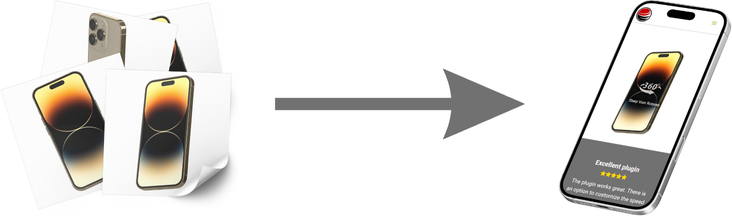
Easy to use
- From NPM or from a CDN
- Wordpress plugin available
- Online tool to configure your presentation
- Embed your presentation in an IFrame
Customize
- Define speed, inertia
- Startup rotation
- A lot of events and methods
- Preloader and multilingual notification
- CDN support for scaling
Up to date
On a regular base we introduce new features. Together with other developers we are always looking for better performance and integrations. Need help with your integration? contact us.
360 Javascript Viewer
A license is a one time payment and bound to a single domain. If you use the latest version from the CDN or NPM you receive new features and bugfixes automatically.
| Free | $69 | |
|---|---|---|
| Number of 360 presentations | unlimited | unlimited |
| Number of views | unlimited | unlimited |
| Number of images | 2 to 365 | 2 to 365 |
| Unlimited Storage | use your own | use your own |
| Tech Support | ||
| No free version icon | ||
| Multiple 360 presentations on the same page | ||
| Zoom option | ||
| Free Wordpress plugin | ||
| Inertia & speed control | ||
| Rotate on start option | ||
| Full API control | ||
| CDN resizing support | ||
| Custom start notification | ||
| Custom loading bar | ||
| All features in API documentation | ||
Are you ready to take your online business to the next level?
In today's fast-paced digital world, captivating your customers is crucial to standing out from the competition. That's why we believe that incorporating 360 product images on your website is an absolute game-changer.
What are 360 Product Images?
360 product images are interactive images that allow customers to view a product from all angles. By rotating the image, customers can see the product from the front, back, sides, and top, giving them a comprehensive view of the product. This interactive experience creates a more engaging shopping experience, helping customers make more informed buying decisions.
Visual Engagement
Say goodbye to flat, lifeless product images. With 360 product images, your customers can engage with your products in a dynamic and captivating manner. They can rotate, zoom in, and explore every detail, creating an emotional connection that drives higher engagement and longer browsing sessions.
Stand Out
In a sea of competitors vying for attention, you need to find ways to differentiate your brand. By adopting 360 product images, you instantly set yourself apart from the competition. Your website will exude professionalism and innovation, leaving a lasting impression on your customers. It's an effective way to showcase your commitment to providing an exceptional shopping experience.
Boost Conversion Rates
By giving your customers a more interactive and realistic view of your products, you'll significantly increase their confidence in making a purchase. Studies have shown that websites incorporating 360 product images experience higher conversion rates compared to those with traditional static images. The ability to examine a product from all angles reduces uncertainty, leading to more informed buying decisions.
Tips for starting with 360 product images on your site
There are complete packages on the market with turntables and special software and even with included 360 viewers. Good solutions but they also have a price and often you are locked in by a vendor. Image hosting doesn't have to be expensive and the integration of the viewer on your website is a one time investment. The only real continues investment is creating the images. Just like now with your product images.
Hardware
You need a camera, lightning and a turntable to create images of good quality. There a lot of suppliers on amazon or Alibaba (starting from $15).
Image software
Use special software to edit the 360 product images, this software often controls the turntable and the camera. It also controls the filenames and the size of the export.
Website integration
Integrate the 360 product images on your site. Add intro animations for getting attention. Use a/b testing for the best result. Check usage of the viewer by firing Google Analytics events when the user interacts with the viewer.